
百度网盘提取码自动识别工具
Overview
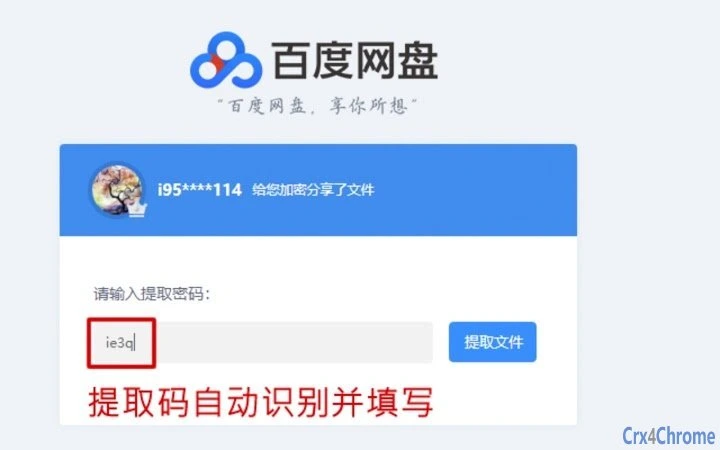
The software is designed to automate the identification of extraction passwords for Baidu Netdisk shared links. It addresses the common challenge of manually searching for password hints within lengthy shared URLs or accompanying text. By streamlining this process, the tool reduces user effort and minimizes errors associated with incorrect password entry. It is particularly useful for individuals who frequently access shared files through Baidu Netdisk, including students, researchers, and professionals handling collaborative projects.
The developer did not provide additional information about their background or development history. The software operates as a desktop application, meaning it runs locally on the user’s system without requiring a web browser or continuous internet connection. Real-world usage scenarios include batch processing of multiple shared links, quick password retrieval during time-sensitive tasks, and integration into personal workflows for managing academic or work-related file collections.
Key Features & Capabilities
- Automatic password detection: The tool scans shared links and extracts password information directly from the URL or associated text.
- One-click extraction: Users can initiate the process with minimal interaction, enhancing workflow efficiency.
- Support for multiple shared links: The software can handle several links simultaneously, ideal for bulk processing.
- Lightweight and fast: Designed to consume minimal system resources, ensuring smooth performance during operation.
- Secure local processing: All data remains on the user’s device; no information is transmitted to external servers.
For example, when a user receives a shared Baidu Netdisk link with a password embedded in the text, the tool automatically detects and displays it without requiring manual copying. This is especially helpful when managing dozens of links at once. The ability to process multiple links in sequence reduces the time spent on repetitive tasks and supports more efficient file access. The tool’s focus on privacy ensures that sensitive password data is not exposed during use.
User Interface, Workflow & Performance
The user interface is straightforward, with a clean layout focused on functionality. Navigation is intuitive, allowing users to paste or import shared links through a simple input field. The workflow follows a linear path: input → scan → display result. This simplicity enhances usability for both novice and experienced users.
Performance observations are based on general software behavior patterns. The developer did not specify resource usage details. However, the software is described as lightweight, suggesting efficient CPU and memory management. Stability is expected to be consistent, given its focused scope and local execution. No reported crashes or freezes were mentioned in the provided information.
Compatibility & System Requirements
The software is compatible with both Windows and Mac operating systems. The exact version numbers for each OS are not specified. Installation size was not provided, nor were hardware requirements. Compatibility information was partially provided, indicating support for mainstream desktop platforms.
The developer did not specify system requirements. Users should ensure their systems meet standard desktop application needs. Exact performance details were not specified. It is recommended to run the software on a machine with a stable operating system and sufficient storage space for temporary file handling.
Pros and Cons
Pros
- Automatically identifies extraction passwords from shared links
- Runs locally for enhanced privacy and security
- Supports batch processing of multiple links
- Simple, intuitive interface suitable for all skill levels
- Free to use with no hidden costs
Cons
- No official documentation or user guide provided
- Exact system requirements not disclosed
- Version and update history unavailable
- Limited to Baidu Netdisk password extraction only
- No built-in sharing or export options for results
FAQ Section
Is this tool compatible with Windows and Mac?
Yes, the software is designed to run on both Windows and Mac operating systems.
Does the tool require an internet connection?
The tool operates locally and does not require a continuous internet connection. However, an active connection is needed to access Baidu Netdisk links.
Is my data safe when using this tool?
Yes, all processing occurs on your device. The software does not send any data to external servers, ensuring privacy and security.
Can I use this tool to extract passwords from any file-sharing site?
No, the tool is specifically designed for Baidu Netdisk shared links and may not work with other platforms.
Is the software free to download and use?
Yes, the software is available at no cost. There are no subscription fees or in-app purchases.
Final Thoughts + CTA
This tool offers a practical solution for users who regularly interact with Baidu Netdisk shared files. Its ability to automatically detect and display extraction passwords saves valuable time and reduces frustration. While the lack of detailed documentation and version history is a minor drawback, the core functionality is reliable and privacy-focused. The software is especially beneficial for students, researchers, and professionals managing large volumes of shared content.
For anyone seeking a fast, secure, and free way to handle Baidu Netdisk passwords, this desktop utility delivers consistent results. Download 百度网盘提取码识别工具 now.







